Most homeowners who are thinking about new siding start the same way. They notice something about their exterior that bothers them, spend some time on Google, and eventually call a contractor. By that point, they're entering a consultation without a real picture of what they want, and a lot of the decision-making happens under pressure during that first conversation.
There's a better way to start. Ridge Top's 3D Designer lets you see your home in different siding materials and colors before you talk to anyone. You can explore combinations, compare options, and get a clear visual direction on your own time, with no sales pressure and no commitment. By the time you do reach out, you're walking into the conversation as an informed buyer rather than someone starting from scratch.
The Problem With Calling a Contractor Before You Know What You Want
When most homeowners call a siding company, they have a general sense that they need new siding but no real vision for what they want. That means the first consultation becomes a design session and a sales pitch at the same time, which isn't a great combination for making confident decisions.
Color and material choices are easy to underestimate until you're actually making them. There are dozens of siding profiles, hundreds of color options, and meaningful differences between materials like vinyl, fiber cement, and engineered wood. Sorting through all of that in an hour-long consultation, while also evaluating the contractor and reviewing a price, is a lot to process at once.
Homeowners who feel overwhelmed by the options tend to either defer the decision and delay a project they're ready for, or make a quick choice they're not fully confident in. The 3D Designer is designed to take that pressure off the table before the conversation even starts.
What Ridge Top's 3D Designer Actually Does
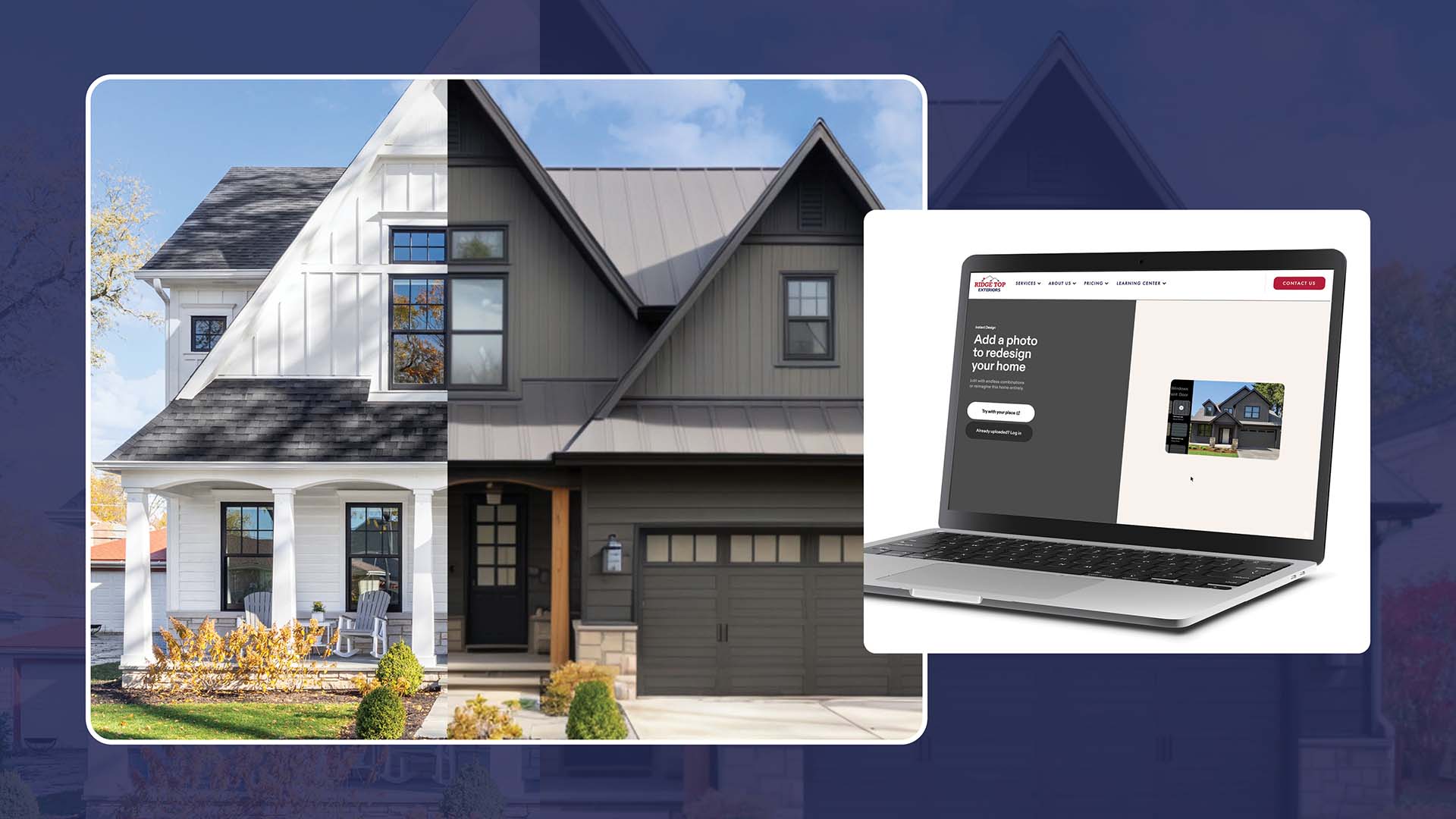
The Ridge Top 3D Designer is a web-based visualization tool that lets you see your home's exterior in different material and color combinations before any work is done. You start by uploading a photo of your home. From there, you can select materials across the full exterior: walls, trim, soffit, fascia, roof, windows, doors, garage, gutters, and more. Every selection applies directly to your uploaded photo so you see the result on your actual house, not a generic stock image.
This is the key difference between this tool and general home design apps. You're not imagining how a color might look on a house that looks something like yours. You're seeing it applied to your actual home, your specific roof line, trim configuration, and proportions, based on the photo you uploaded. That context matters a lot when you're trying to figure out whether a dark charcoal is going to feel too heavy or whether a warm gray is going to read as too bland.
The concept is straightforward: rather than browsing generic inspiration photos and hoping they translate to your home, you start from a real photo of your actual house. As Renoworks notes in their guide to exterior design software, visualization tools help homeowners see how different design elements will look in reality before any work begins. The Ridge Top 3D Designer applies your chosen materials directly to your uploaded photo so what you see reflects your home's real proportions, roofline, and context.
How to Use It: A Step-by-Step Walkthrough
The tool is built to be straightforward, and you don't need any design experience to get useful results from it. Here's how it works.
- Upload a photo of your home. Take a straight-on exterior photo and upload it. The tool builds its rendering directly from your image, so everything you see reflects your actual house.
- Choose your wall material. Select from the siding options Ridge Top installs, including James Hardie HardiePlank lap siding in specific ColorPlus finishes like Arctic White, Cobble Stone, and others. Each selection applies to your home photo in real time.
- Adjust trim, soffit, fascia, and gutters. The tool lets you change every element of the exterior independently. Trim color, soffit, fascia, and gutter selections all update the rendering so you can see how the full exterior reads together, not just the siding walls.
- Change the roof, windows, doors, and garage. You can also select different roofing materials and colors, window styles, door colors, and garage door options to complete the picture. This is where you start to see how the full exterior combination works.
- Compare combinations and move to your quote. Once you have a combination you like, the tool connects directly to Ridge Top's instant quote tool so you can get a real starting estimate based on your home's size and the materials you've selected.
Most homeowners spend 20 to 30 minutes in the tool and come away with two or three combinations they genuinely like. That's usually enough to have a focused, productive conversation with a consultant.
What Decisions the Tool Helps You Make
The 3D Designer isn't just a pretty picture generator. It helps you work through the real decisions that affect how your project looks and what it costs.
Material choice. Seeing vinyl, fiber cement, and engineered wood on your actual home helps you feel the visual difference between them. A James Hardie fiber cement product has a different surface texture and weight than vinyl, and that shows up in the 3D image. You can also explore the full range of ColorPlus factory-finish colors directly in the tool.
Color family. You might go in thinking you want a warm gray and come out realizing your roof pulls strongly cool, making a blue-gray the better fit. The tool helps you discover those dynamics before you're committed to anything.
Contrast level. High-contrast combinations with dark siding and bright white trim read completely differently from low-contrast monochromatic approaches. Seeing both on your specific house is more useful than reading about the theory.
Profile direction. Horizontal lap siding makes a house feel wider. Board and batten reads more vertical and contemporary. These effects are subtle but real, and they show up clearly in the rendering.
Full exterior coordination. Changing just the siding on your home photo and leaving the roof and trim at their defaults often reveals mismatches you wouldn't have caught from a color chip alone. The tool lets you coordinate everything at once so the full picture looks intentional before anyone shows up with materials.
Why This Changes the Consultation Conversation
When a Ridge Top consultant comes to your home or connects with you virtually, the conversation is completely different if you've already used the 3D Designer. Instead of starting from 'what are my options,' you're starting from 'here are two combinations I like, and here's what I'm trying to decide between.'
That's a much more productive starting point. The consultant can focus on helping you make a final decision with the benefit of their field experience, rather than trying to introduce the entire product range in a single meeting. You also arrive at the conversation having already tested your own instincts, so you're less susceptible to being talked into something that doesn't actually feel right to you.
This matters for the outcome of the project. Homeowners who have a clear visual direction before installation begins are far less likely to experience post-project uncertainty about whether they made the right choice.
What the 3D Designer Cannot Do
Being upfront about the tool's limits is part of using it well. The 3D Designer gives you a strong directional sense of how a combination will look, but it's not a substitute for physical samples or a professional consultation.
Colors on a screen look different than colors on a physical surface in natural light. A rendering shows you the relationship between colors accurately, but the specific warmth or depth of a shade is better evaluated with a physical sample held against your actual house at different times of day. The tool narrows the field; samples confirm the final choice.
The rendering also doesn't account for how materials perform over time in your specific climate. A consultant who has installed siding across Wisconsin, Illinois, and Florida can tell you things about how a particular product weathers in freeze-thaw conditions or sustained UV exposure that no visualization tool can show you.
How to Move From the Tool to a Real Estimate
Once you've found a combination you're genuinely interested in, the next step is already built into the tool. The 3D Designer connects directly to Ridge Top's instant quote tool, so you can move from a visual you like to a real starting estimate without starting over. That's by design. The goal is to help you arrive at a consultation already knowing what you want and what it roughly costs.
Most homeowners who use the 3D Designer before their first consultation tell us it makes the whole process feel less overwhelming. That's exactly what it's designed to do. Visit our siding service page to see the full range of materials and profiles we install, or learn more about how our process works from first contact through completed installation.
You don't have to figure out what you want during a sales conversation. Comparing siding companies near me is a lot easier when you walk in knowing what you want. The 3D Designer gives you a way to build that confidence before any contractor shows up.
Whether you're looking for a new siding installation or just trying to get a siding estimate near me without the pressure of a sales call, the 3D Designer is a better starting point than going in blind.